The public summit page shows everybody the agenda names as Featured Speakers. Coaches lists them, and the order you drag them into is the order the page shows them in. The order is the summit's own: the Team page, and every other summit, keep theirs.
The screens pictured here are an example ministry’s, so the names and figures in them are not yours. Everything they show works the same way in your own admin.
Open the summit and press Coaches in the list down the left, under Agenda.
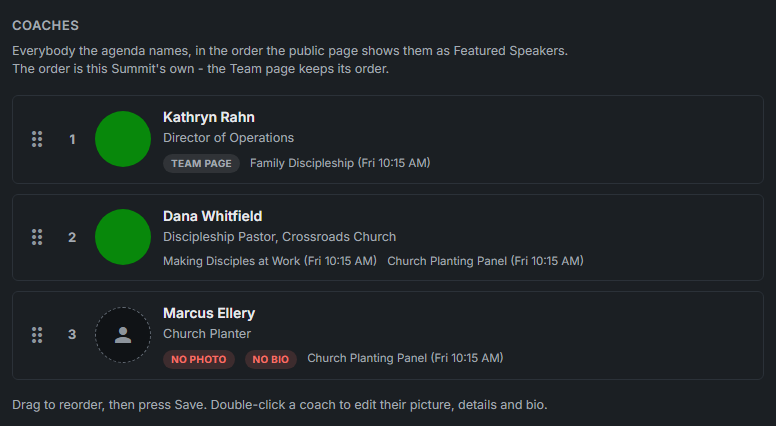
Everybody on a session is listed once, with their picture, title, organization and the sessions they lead. Somebody appears as soon as they are put on the agenda, and leaves when they are taken off it.
Drag a coach by the handle on the left to where they belong.
The number beside each one is their place on the page. Until anybody is dragged, the list follows each person's own Sort Order, as the page always has; a coach put on the agenda later joins at the end.
Press Save.
The order is kept with the summit, and you stay on Coaches. Web in the rail shows the real page with the speakers in their new order.
Double-click a coach to change their picture, title, organization or bio.
A coach opens Edit Coach. A Team member - marked TEAM PAGE - opens their Team page record, because it is their one record: what you change there changes the Team page too. In either, drag on the picture to choose the part that stays in the round frame.
See what a visitor sees.
On the summit page each speaker has a card the same size as the rest: their picture in a circle, name, title and the first two lines of their bio. Pressing a card opens their whole bio, their link, and the sessions they lead.
NO PHOTO and NO BIO mark who is missing something the public page shows. Still to do lists them too, each with a button that opens the person.